How to choose a safer online file converter
No checklist can guarantee that a website or downloaded file is safe. Before uploading, verify the exact domain, read how files are handled, avoid tools that demand software for an ordinary conversion, and scan the result before opening it.
Why converter safety deserves a check
In March 2025, the FBI warned that criminals were promoting malicious file-converter and downloader websites. The warning described sites that could install malware or collect information from submitted files. That does not mean every online converter is malicious; it means the site and the downloaded result should be evaluated before use.
Seven checks before you convert
Check the exact domain
Type or inspect the address carefully. Lookalike spellings, unexpected subdomains, and a prominent search ad are not proof that a service is trustworthy.
Expect HTTPS, but verify more
A secure browser connection helps protect data in transit. It does not prove what a site does with a file after it arrives.
Question required downloads
A normal browser conversion should not require an extension, installer, or executable. Leave if the page unexpectedly asks you to install one.
Read the file policy first
Look for a specific deletion window, what operational records remain, who operates the service, and a way to report problems.
Keep sensitive files offline
For confidential, financial, identity, health, legal, or client material, prefer an approved local tool or your organization’s controlled workflow.
Inspect and scan the result
Confirm the extension is the format you expected. Keep browser and security warnings enabled, scan the download, and do not bypass a warning just to open it.
Check the output
Compare page count, duration, dimensions, resolution, and important settings with the source. A successful download is not proof that the conversion is complete or correct.
Google also recommends taking download warnings seriously and using security scanning when a download is suspicious. Review Google Chrome download-safety guidance.
What happens in this Go converter preview
These statements describe the supported audio and image conversions in this Go preview. The production Convertr site and specialist conversion tools may use different workflows; check their own notices before uploading a file.
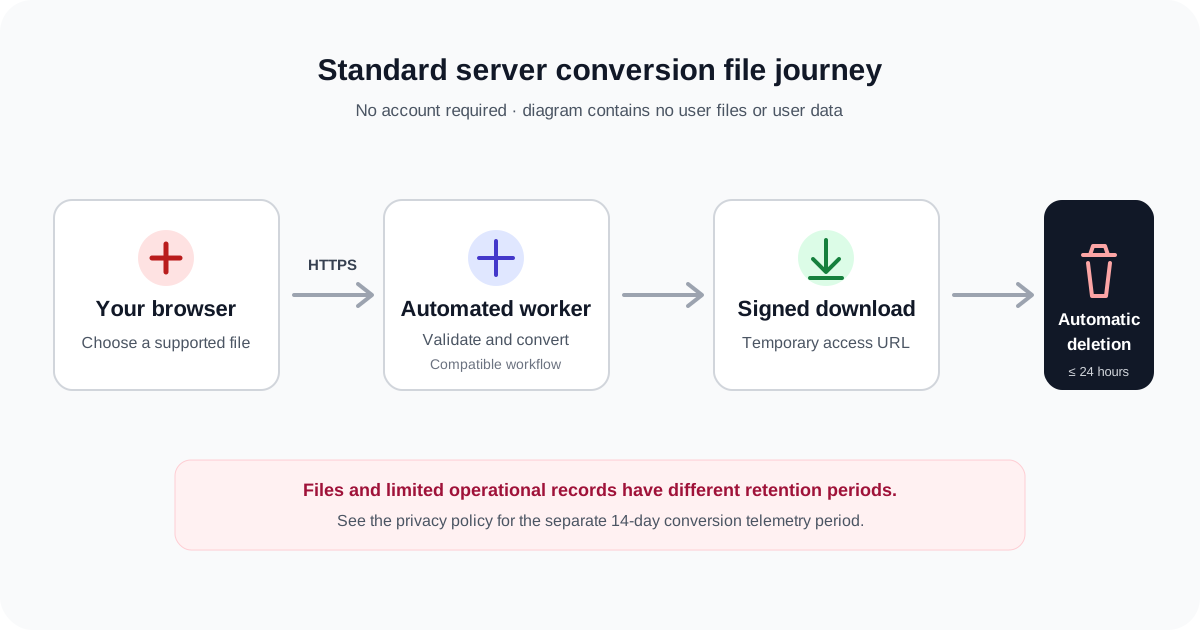
- Upload and processing
- Your browser uploads the file over HTTPS. Convertr validates the request and sends it to a compatible automated conversion worker. No account is required for the public conversion flow.
- Temporary download
- The result is made available through a time-limited signed download URL. A link should still be treated as private and not shared unnecessarily.
- File deletion
- The Go preview deletes uploaded files and converted outputs within 24 hours of upload. After conversion, you can select Delete files now on the conversion page to remove them immediately. Downloading alone does not trigger a five-minute cleanup timer in this preview.
- Operational records
- Conversion files and limited operational records are separate. The Go preview removes its conversion job record with the files; application or server logs and contact records may have different retention, described in the privacy policy.
The 1 GB upload policy
The standard converter accepts an individual upload up to exactly 1 GiB (1,073,741,824 bytes), commonly labelled 1 GB in the interface. Files above that limit are rejected before conversion. Convertr does not intentionally reduce output resolution, duration, codec, bitrate, dimensions, or quality merely to control server load; available settings still depend on the selected workflow and formats.
What this page does not claim
This is a transparency statement, not a security certification, independent audit, penetration test, or guarantee that every website, file, conversion, or download is malware-free. We do not use this page to claim an external certification, encryption at rest, or antivirus scanning that has not been verified and documented.
How we verified these statements
The 3 August 2026 review covered the production Laravel conversion flow and its deployed workers. The Go preview uses a separate implementation; we checked its upload limits, worker storage, signed downloads, cleanup and deletion paths with isolated tests. It has not replaced or been audited on the production worker fleet.
This review covers product behavior and public documentation. It does not replace an independent security assessment. We review this page when relevant behavior changes and schedule a full review at least quarterly. Corrections can be reported through the contact page without attaching a confidential file.
Frequently asked questions
Is any online converter guaranteed to be safe?
No. Use several checks together, keep sensitive material in an approved offline workflow, and treat unexpected installers or security warnings as reasons to stop.
When does this Go preview delete conversion files?
Uploads and converted outputs are deleted within 24 hours of upload. After conversion you can use Delete files now to remove them immediately; a download alone does not start a five-minute cleanup timer. Operational records have separate retention.
Does every Convertr tool upload my file?
No. Some utilities run locally in the browser, while standard media and document conversions use an automated server worker. Check the selected tool’s instructions before providing a file or other input.